These FAQs cover the most important concepts every user, developer, or business should understand about a modern web application. Knowing these essentials helps you build, secure, optimize, and successfully deploy an application that performs flawlessly in today’s digital world.
📘 FAQ: Top 10 Web Application Questions (With Expert Answers)
1. What are the essential features of a successful web application?

A successful web application includes fast performance, intuitive UI, strong security, responsive design, scalability, reliable authentication, and seamless integrations. It should load quickly, work on every device, protect user data, and deliver a frictionless user experience.
2. How do I develop a secure web application?

To build a secure web application, follow these practices:
– Use HTTPS and TLS encryption
– Implement secure authentication (OAuth2, MFA)
– Sanitize and validate inputs
– Protect against SQL injection and XSS
– Use hashed and salted passwords
– Conduct frequent penetration testing
– Security should be woven into every stage of development — not added at the end.
3. What are the best frameworks for building a modern web application in 2025 that will also work in 2026?

The best web application frameworks going into 2026 continue to be the ones that balance speed, scalability, security, and developer productivity. Here are the top-performing and future-ready options:
1. React – Still the leading choice for dynamic, component-driven UI
Reliable, mature, and supported by a massive ecosystem.
2. Next.js – The most powerful full-stack React framework
SEO-ready, fast, and now enhanced with Server Actions and React Server Components.
3. Angular – Enterprise-grade structure with long-term stability
Ideal for large systems requiring robust architecture and TypeScript end-to-end.
4. Vue.js – Lightweight, flexible, and developer-friendly
A favorite for teams that want simplicity without sacrificing capability.
5. SvelteKit – Fastest and cleanest modern app framework
Known for near-zero JavaScript overhead and rapidly growing adoption in 2026.
6. Django (Python) – Secure, scalable, and perfect for backend-heavy apps
A top choice for startups, fintech, and data-driven platforms.
7. Laravel (PHP) – Elegant MVC architecture with built-in tooling
Remains one of the easiest and most productive backend frameworks.
8. Nuxt 3 – The Vue-based full-stack framework rising quickly in 2026
Improved performance, server-side rendering, and API routes built in.
9. Remix – Gaining traction for state management and web standards-first architecture
Optimized for speed, accessibility, and server-side rendering.
10. Astro – Excellent for content-heavy web apps with partial hydration
Minimal JavaScript by default and ideal for hybrid website/web-app experiences.
4. What programming languages are commonly used for web app development?

Most web application development uses:
– JavaScript (React, Node.js)
– Python (Django, Flask)
– PHP (Laravel)
– Java (Spring Boot)
– Ruby (Ruby on Rails)
– C# (ASP.NET Core)
JavaScript dominates the modern landscape, but Python and PHP remain strong for backend systems.
5. Explain the difference between a website and a web application with examples.

A website mainly provides information with static content.
Examples: blogs, portfolios, news sites.
A web application is interactive software users can manipulate in real time.
Examples: Gmail, Google Docs, Slack (browser version), online banking.
Websites inform.
Web applications let users take action.
6. How do REST APIs work within web apps?

A REST API allows a web application to communicate with servers or external services. It uses HTTP methods like GET, POST, PUT, and DELETE to exchange data in JSON format.
Example: A login form calls a POST endpoint — the API checks credentials — and returns a success or failure response.
REST APIs make apps fast, scalable, and modular.
7. How can I optimize web application performance for faster load times?

Improve web application performance by:
– Compressing images and static files
– Using browser caching
– Utilizing CDNs
– Minifying CSS/JS
– Lazy loading assets
– Implementing database indexing
– Reducing server response time
Using modern build tools like Vite or Webpack
Speed = user satisfaction + higher conversions.
8. What are the best practices for responsive web application design?

To make a web application responsive:
– Use fluid grids and flexible layouts
– Apply mobile-first design
– Use scalable typography and buttons
– Test across Android, iOS, and tablets
– Implement CSS frameworks like Tailwind or Bootstrap
– Avoid heavy scripts on mobile
A responsive design ensures your app looks and performs perfectly on all screen sizes.
9. Create a database schema for a user authentication system in a web application.
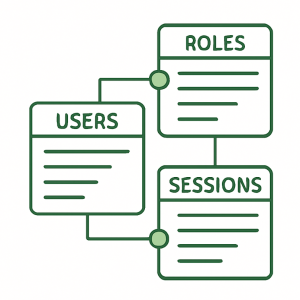
A basic web application authentication schema includes tables such as:
– Users Table
id (PK)
username
email
password_hash
role
created_at
updated_at
– Sessions Table
session_id (PK)
user_id (FK)
token
expires_at
– Roles Table (optional)
id
name
permissions
This structure supports login, permissions, and secure session handling.
10. Generate a step-by-step guide on how to deploy a web apps to the cloud.

To deploy a web application to the cloud, follow these steps:
1. Choose a cloud provider (AWS, Google Cloud, Azure, DigitalOcean).
2. Prepare your codebase and set environment variables.
3. Containerize your app using Docker (optional but recommended).
4. Set up a server instance (EC2, App Engine, Droplets).
5. Install runtime dependencies (Node, Python, PHP, etc.).
6. Upload your code using Git, CI/CD, or SFTP.
7. Configure your database (RDS, Cloud SQL, MongoDB Atlas).
8. Enable HTTPS using Let’s Encrypt or cloud certificates.
9. Set up auto-scaling for traffic surges.
10. Monitor logs and performance using built-in cloud tools.
Cloud deployment improves uptime, security, and global accessibility.
Conclusion
Understanding these top web application questions equips you to build, secure, and optimize modern apps that perform flawlessly. Whether you’re a beginner or an experienced developer, applying these insights will save time, reduce errors, and enhance user experience.
Ready to take your web application to the next level? Partner with experts who can bring your vision to life: Ennova Studio – your trusted web application design and development partner.